How Much RAM Do You Need for Local AI? (2026 Guide)
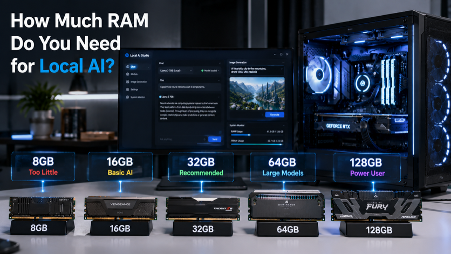
The amount of RAM in your Mac decides which AI models you can run, how fast they respond, and how good the results are. For local AI, 16GB is the minimum worth working with, 32GB handles most use cases without compromise, and 64GB or more opens up models that match the quality of paid cloud services, running completely privately on your own machine.
Why Does Local AI Need So Much RAM?
Local AI needs so much RAM because the entire model has to load into memory before it can do anything. Every word it generates requires reading through billions of stored values, and that has to happen fast, over and over, in real time.
When you use cloud AI tools like ChatGPT, the AI runs on someone else's powerful computers. Your device just sends a message and gets a reply back. Running AI locally is the opposite: the entire model has to live in your RAM while it works.
This is different from normal computer use. Opening Safari or playing music barely touches your RAM. Running a 7B AI model needs several gigabytes all to itself, and it needs that memory available instantly. For a deeper look at the trade-offs, read this local AI vs cloud AI comparison.
Mac vs PC: Why RAM Works Differently for Local AI
On a Windows PC, there are two separate memory pools. System RAM handles your apps and operating system. Your graphics card has its own separate memory called VRAM. A popular GPU like the NVIDIA RTX 4090 comes with 24GB of VRAM, and if an AI model is larger than 24GB, it simply will not run fully on that GPU.
On a Mac with Apple Silicon, including M1, M2, M3, and M4, there is one shared memory pool called unified memory. The CPU, GPU, and Neural Engine all pull from the same pool. There is no separate VRAM. This means a 32GB Mac can run AI models that a 24GB RTX 4090 cannot fit entirely in GPU memory.
One thing to know: macOS uses about 3-4GB of your RAM just to run the system. And by default, only around 75% of your total unified memory is available for AI model weights. So on a 16GB Mac, you effectively have about 10-12GB for your AI model. Keep that in mind when choosing a model size. See which models work best for your setup in this guide to the best local AI models for Apple Silicon.
Understanding Model Size: What Actually Takes Up RAM
AI models come in different sizes, measured in parameters, or numbers in the billions. A 7B model has 7 billion parameters. A 70B model has 70 billion. More parameters generally mean smarter, more capable output, but also more RAM needed.
The same model can be stored in different formats called quantizations. Think of it like image quality settings. A high-res photo takes more space than a compressed one. Same picture, different file size.
Here is how common formats compare for a 7B model:
- FP16 (full quality) - about 14GB of RAM
- Q8 (slight compression) - about 7.4GB, with almost no quality difference
- Q4_K_M (moderate compression) - about 4.1GB, with a small quality trade-off
- Q2_K (heavy compression) - about 2.6GB, with a noticeable quality drop
For most users, Q4_K_M is the best balance of solid quality and roughly half the RAM of Q8.
A good rule of thumb: your model should use no more than 60% of your available RAM. The rest goes to macOS, your running apps, and the conversation history the model keeps in memory.
RAM Requirements by Model Size
Here is a practical reference for how much RAM you need based on model size:
| Model Size | Example Models | RAM at Q4_K_M | Recommended RAM | Best For |
|---|---|---|---|---|
| 3B params | Phi-3 Mini, Llama 3.2 3B | ~2GB | 8GB | Simple tasks, quick queries |
| 7-8B params | Llama 3.1 8B, Mistral 7B, Qwen3 8B | ~4-5GB | 16GB | Daily writing, chat, and coding help |
| 13-14B params | Qwen 2.5 14B, CodeLlama 13B | ~8-9GB | 24GB | Better reasoning, power users |
| 30-34B params | Qwen 2.5 32B, CodeLlama 34B | ~19-20GB | 36-48GB | Professional-grade tasks |
| 70B params | Llama 3.3 70B, Qwen 2.5 72B | ~40-42GB | 64GB+ | GPT-4-class local inference |
The golden rule: your model's file size should not exceed 60% of your total RAM. On a 16GB Mac, that means sticking to models around 8-9GB or smaller. On a 64GB Mac, 40GB models run with room to spare.
Which RAM Tier Fits Your Use Case?
Model size tells you the minimum RAM you need. Your workflow tells you how much you actually need.
16GB - A Good Starting Point
16GB is enough to run 7-8B models at Q4_K_M or Q8 quality. This covers most everyday AI tasks: writing, summarizing documents, offline chat, and privacy-focused AI use. Where 16GB gets tight is long back-and-forth conversations. The model stores the full conversation history in memory, and that adds up. Running other heavy apps like video editing software at the same time can also cause slowdowns. For focused AI use on Lekh AI, 16GB works well.
32GB - The Sweet Spot for Most Mac Users
32GB is where local AI starts to feel effortless. You can comfortably run 13B to 30B models, which are noticeably smarter than 7B models for complex tasks. You can also have other apps open without worrying about RAM pressure. This is the recommended tier for developers, writers, and anyone who uses AI as part of their daily workflow. A 70B model can technically run at 32GB using heavy Q2 compression, but quality takes a hit; 64GB is the right home for 70B.
64GB+ - For the Most Capable Local Models
64GB unlocks 70B models like Llama 3.3 70B at Q4 quality, the first tier where local AI genuinely matches the output quality of cloud services like GPT-4, with full privacy and no subscription. This is the tier for researchers, heavy users, and anyone who wants the best possible results without sending data to a cloud server.
Is 8GB RAM Enough for Local AI?
Technically, yes, but the limits are real. After macOS uses 3-4GB, you have roughly 4-5GB left for an AI model. That is enough for 3B models at Q4 quality, or a 7B model only at heavy Q2 compression, which means noticeably weaker responses.
The bigger issue is headroom. With 8GB, you have almost no room for longer conversations, and running any other app alongside the AI creates pressure. If you are on an 8GB Mac, smaller models like Phi-3 Mini still produce useful results for focused tasks like quick summaries or short writing help. But for a consistently good experience, 16GB is the real floor.
Does RAM Speed Matter for Local AI?
Yes, but not in the way most people expect. For local AI, what matters is not just how much RAM you have, but how fast data moves between your RAM and your GPU. This is called memory bandwidth.
AI models process tokens, or words, one at a time, and each token requires the GPU to read through the model's weights in memory. Faster memory means faster token generation, or more words per second in your responses.
This is one area where Apple Silicon has a big advantage. The M4 Max delivers around 546 GB/s of memory bandwidth. A typical DDR5 PC desktop delivers around 80-100 GB/s. This is why an M2 Mac often produces faster AI responses than a powerful PC running the same model, even though the Mac may have less total RAM.
On a PC, upgrading to faster DDR5 RAM gives a modest 10-20% boost. But capacity still matters more than speed for most users. More RAM lets you run larger models, and a bigger model at Q4 will outperform a smaller model at full precision.
Frequently Asked Questions
How much RAM do I need to run local AI on a Mac?
16GB is the minimum for a useful experience. 32GB is recommended for running 13B-30B models comfortably day to day. 64GB unlocks 70B-parameter models at full Q4 quality.
Is 16GB RAM enough for local AI?
Yes. 16GB runs 7-8B models at Q4_K_M or Q8 quality without issues. It handles everyday AI tasks like writing, summarizing, and offline chat well. It gets tight with very long conversations or when running heavy apps at the same time.
Is 64GB RAM enough for local AI?
64GB is more than enough for the vast majority of local AI use. It comfortably runs 70B models like Llama 3.3 70B at Q4, with output quality that competes with GPT-4, with room to spare.
Can I run a local LLM with only 8GB RAM?
Yes, but you are limited to 3B models or heavily compressed 7B models. It works for simple, focused tasks, but the experience is limited. 16GB is the practical minimum for a good local AI setup.
What is the difference between RAM and VRAM for local AI?
On a PC, RAM and VRAM are separate. Your GPU can only use its own VRAM for AI models. On a Mac with Apple Silicon, RAM and VRAM are the same unified memory pool, which means Macs can run larger models than many PC GPUs allow.
Start Running Local AI on Your Mac
Now that you know your RAM tier, you know which models will run smoothly on your machine. 16GB gets you capable 7-8B models. 32GB opens up professional-grade models. 64GB puts GPT-4-class AI on your desk, fully private and offline.
Lekh AI for Mac handles model selection, quantization, and setup automatically: no terminal commands and no configuration files. It works on every Apple Silicon Mac from M1 to M4. If you prefer AI on the go, Lekh AI for iPhone brings the same private, on-device experience to your phone.
To go deeper, read Why Run AI Locally? 6 Benefits Explained, How to Run AI Models Locally on Mac, compare local AI vs cloud AI, explore local AI video generation on Mac, or browse the local AI models available in Lekh AI.
Ready to try local AI?
Download Lekh AI and run powerful AI models on your device. Free on the App Store.
Download Lekh AI